In a Qlik dashboard, it's often necessary to find the right balance between data analysis and the protection of sensitive information.
For example, each salesperson may need access to their own detailed resultswhile only seeing anonymized indicators for othersThis approach makes it possible to compare performance or calculate global totalswithout ever exposing colleagues’ individual data.
In this article, we will see how to implement a dynamic Section Access in Qliktoanonymize all or part of the sales while keeping the entire dataset intact within the data model.
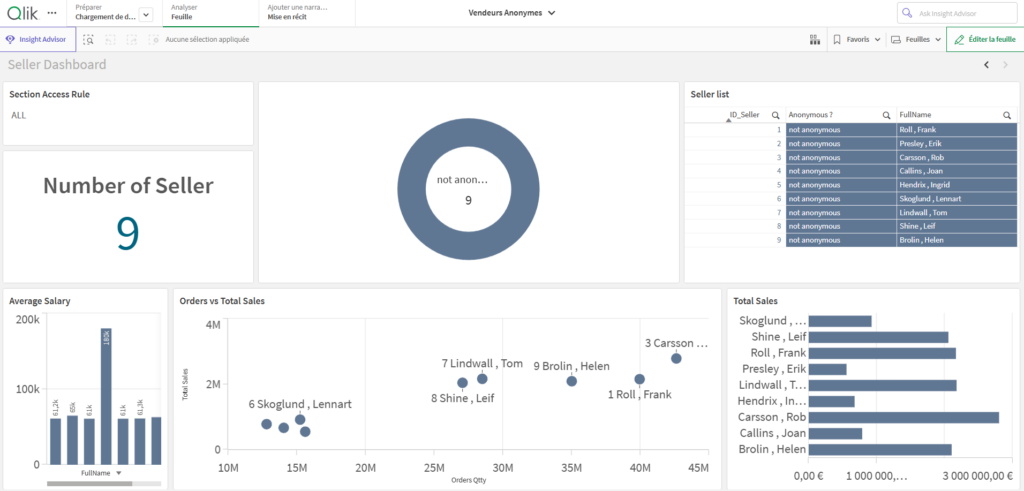
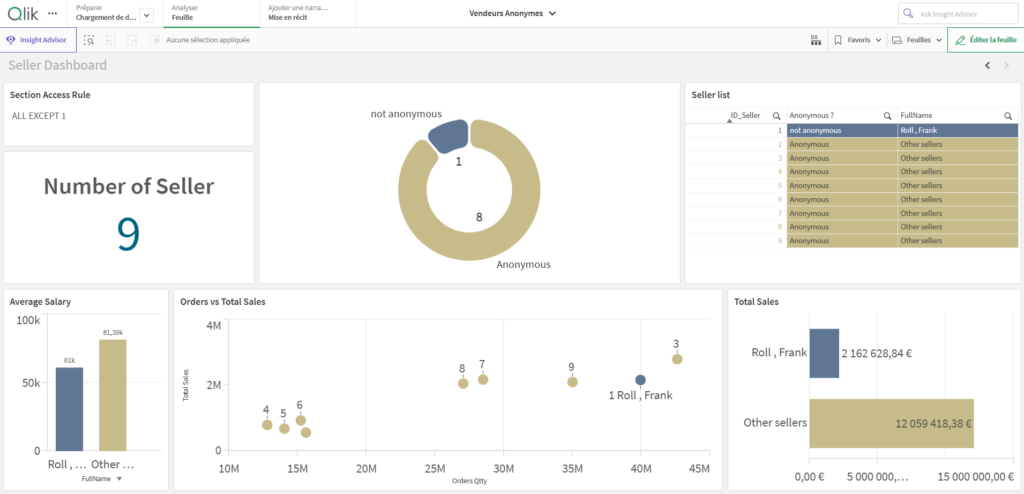
Below is the result obtained before and after anonymization:
Dashboard before anonymization
Dashboard after anonymization
Objectives
The goal of this approach is to reconcile business analysis with the protection of sensitive data.More specifically, it aims to:
Keep all salespeople in the main table in order to calculate totaux reliable totals and global indicators.
Anonymize certain salespeople for users who are not authorized to view detailed data.
Enable analyses such as:
“My sales compared to the total of other salespeople”
“All salespeople except me”
“All salespeople anonymized”
How It Works
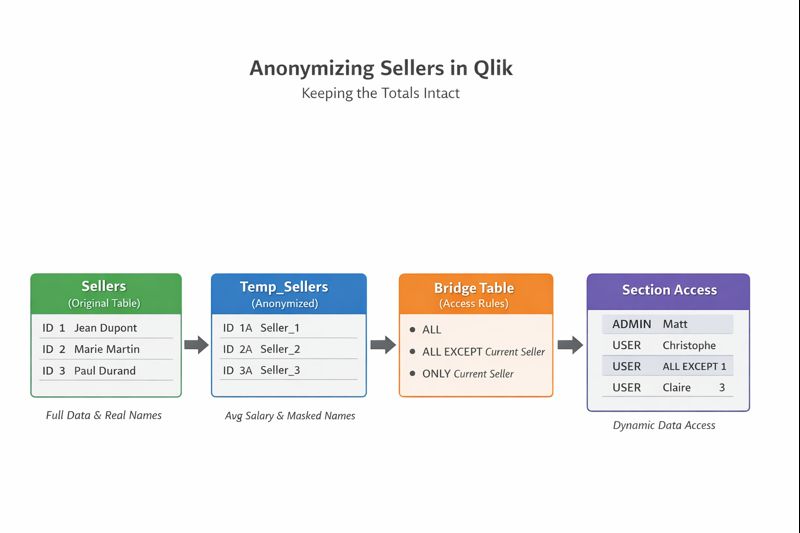
The script is based on three main concepts.. The first consists of creating an anonymous copy of the salespeople..
Creating an Anonymous Copy of Salespeople
Each salesperson is duplicated in the data model under an anonymized identity:
Salespeople are renamed using generic identifiers (Seller_1, Seller_2, etc.).
Personal information (last name, first name, office, title) is replaced.
Individual salary is replaced with the global average salary to ensure confidentiality.
The data remains complete and fully usable; only individual identification is neutralized.
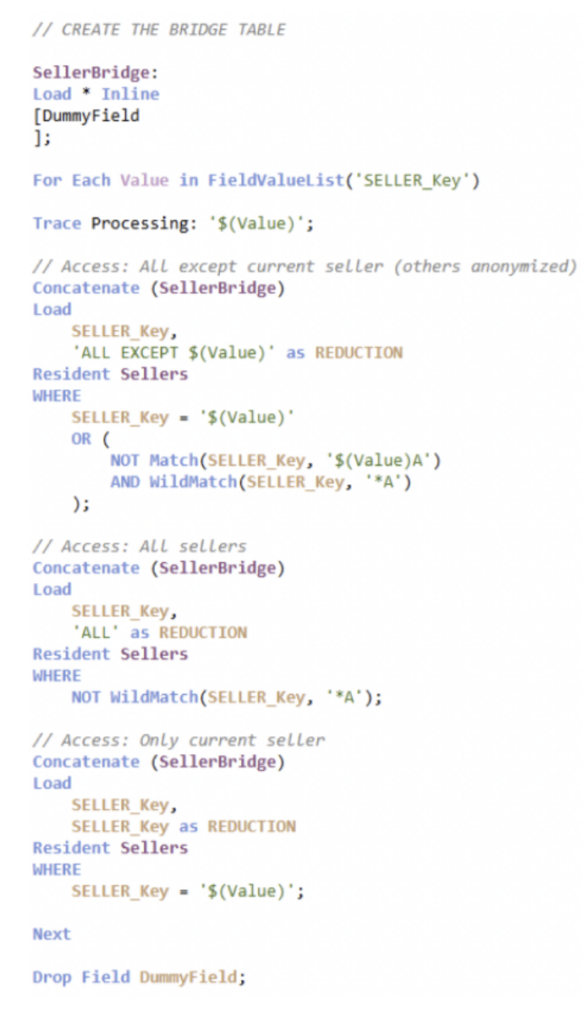
Building a “Bridge” Table for Section Access :
This table defines access rights per salesperson.
It contains all possible combinations:
Access to all salespeople
Access to all except the current salesperson
Access only to the current salesperson
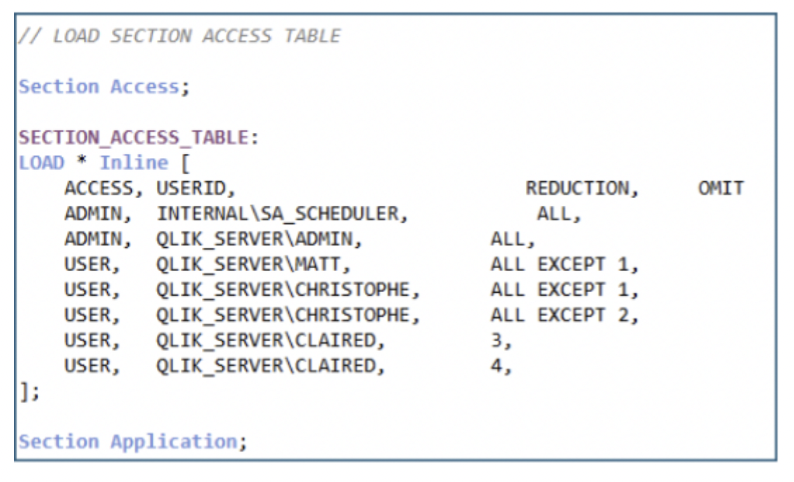
Defining Section Access
Users are associated either with salesperson keys or with anonymized combinations.
Access restriction rules are then applied automatically when the application is loaded, ensuring consistent and transparent access control.
Managing Access Rights via the Bridge Table
The script automatically generates all possible combinations for each salesperson:
Full access (ALL)
Access to all except oneself (ALL EXCEPT)
Access only to oneself
This information is then used by Section Access to dynamically control data visibility.
A diagram of the modeling steps is shown below :
Benefits of This Method
Enables comparative analysis without exposing sensitive data..
Keeps all salespeople in the table for totals and KPIs.
Compatible with dynamic data : new salespeople can be added without modifying the script.
This method allows sales teams to compare their performance with that of others without ever accessing confidential individual data. Each user can position themselves relative to averages or global trends while respecting colleagues’ privacy.
Combining anonymization with dynamic Section Access offers an excellent compromise between security and analysis: sensitive data is protected while Qlik’s analytical value is fully preserved.
Before / After Anonymization: Understanding the Impact of Section Access
To fully understand the value of this approach, it is essential to compare the same dashboard in two situations:
Before anonymization
After applying Section Access
The goal is not simply to hide names, but to ensure that analyses remain relevant, readable, and actionable, despite access restrictions.


Leave a Reply